
Setting Up A Cync Wire-Free Keypad Dimmer
Open the Cync app, then follow the steps below to configure a Cync Wire-Free Keypad Dimmer Smart Switch / Remote.
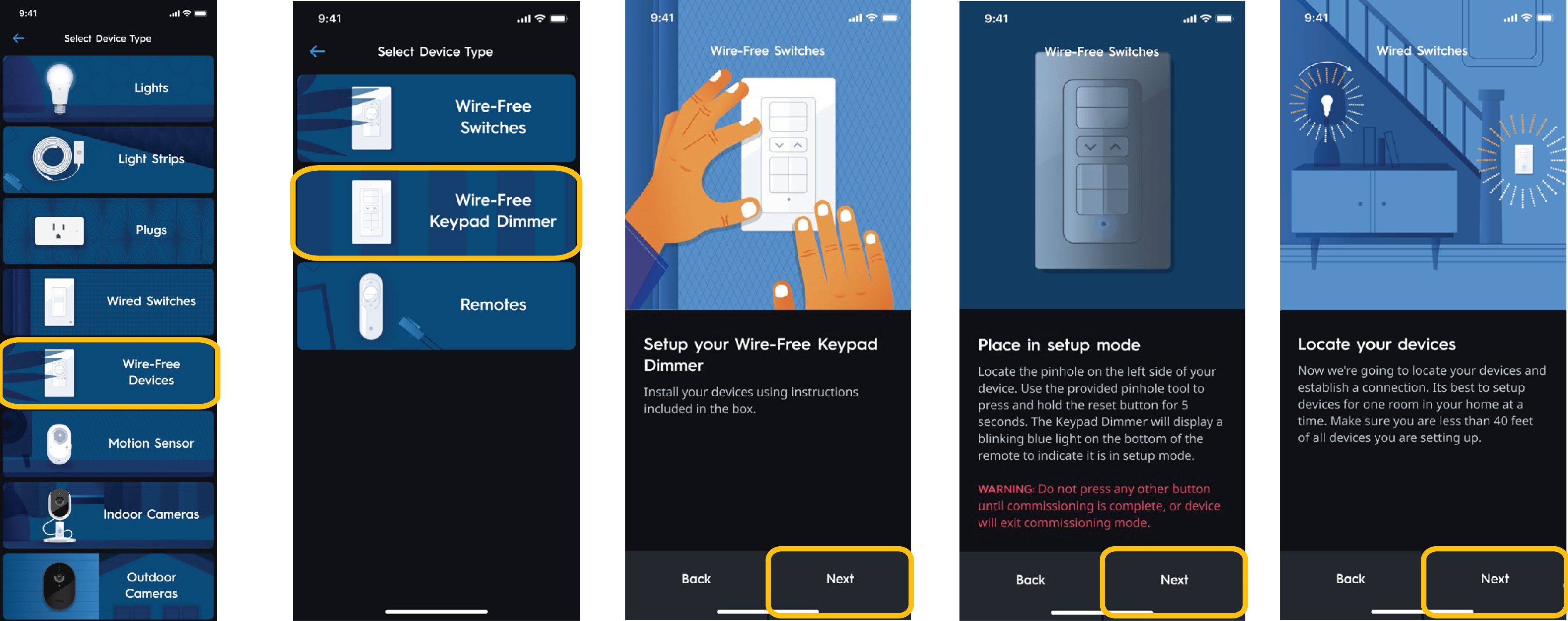
Locate Keypad Dimmer
- Tap Wire-Free Setup.
- Select Wire-Free Keypad Dimmer.
- Ensure the Keypad is installed as desired, then choose next.
- Using the reset pin, press the pinhole reset button for 5 seconds. A blinking blue light will indicate it is in Commissioning Mode.
- Keep the mobile device used to setup the remote within 40 feet and line of sight of the Wire-Free Keypad Dimmer, then tap next.
Configure Keypad Dimmer
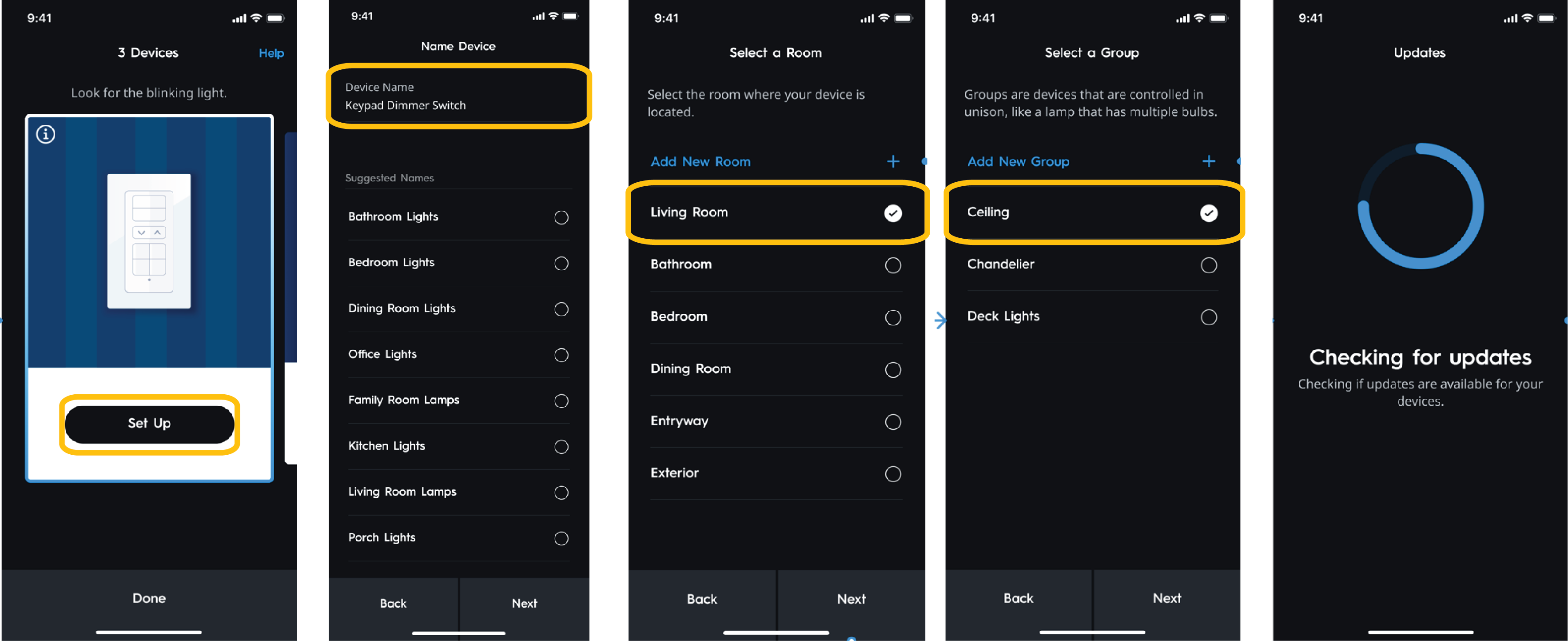
- Once the Wire-Free Keypad Dimmer has been discovered, select Set Up.
- Name the Wire-Free Keypad Dimmer.
- Choose the room the Wire-Free Keypad Dimmer is within.
- Add the Wire-Free Keypad Dimmer to a group and choose next.
Scenes
Once updates are complete, the Keypad Dimmer is now fully configured and can take advantage of the following Scenes that set the associated lights to the settings described.
Notes:
- Multiple presses of a single button cycle through Scene types.
- Scenes cannot be assigned to different buttons.
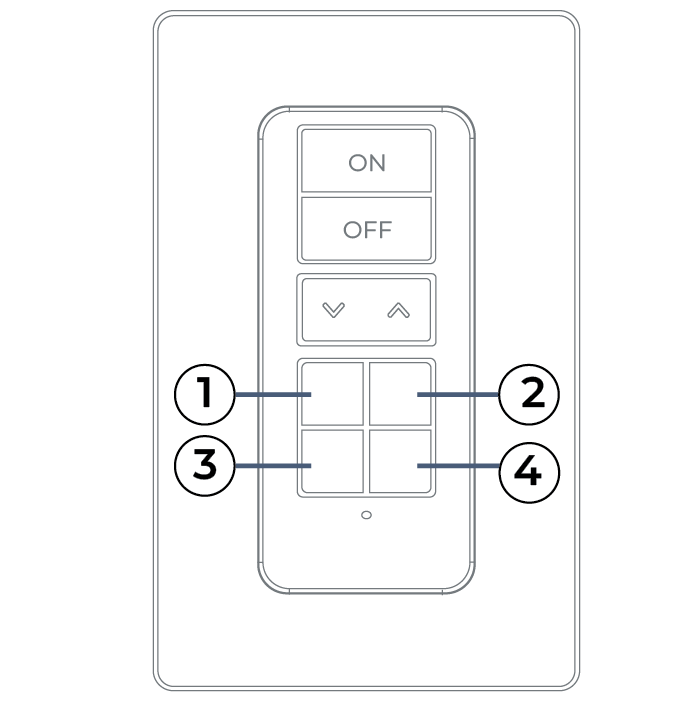
Every Day Scene Types (Button 1)
- Normal - 4000K, 100% brightness (neutral white for daily use.
- Relax - 2700K, 100% brightness (warm, full brightness for a cozy feel.
- Bright - 5500K, 100% brightness (cool, crisp white for focus.
Entertainment Scene Types (Button 2)
- Movie Deep Blue - 1% Brightness creates a cinema-like atmosphere.
- Gaming Cyber Preset - Vibrant, dynamic RGB cycling to enhance immersion.
- TV Show - 3000K, 40% brightness that is comfortable warmth for watching TV.
- Party Rainbow Preset - Fun, cycling colors to energize the room.
Social Scenes Types (Button 3)
- Dinner - 2700K, 50% brightness that is warm, dimmed for an intimate dining setting.
- Conversation - 3000K, 60% brightness with warmth but bright enough for socializing.
- Soft Green - RGB Green, 50% brightness, creating a relaxed, calm vibe that’s still social.
Night Light Scene Types(Button 4)
- Night Light - Red, 10% brightness. Soft red is ideal for night as it minimizes disruption to sleep.
- Sleep - Soft Purple, 1% brightness allows for minimal light to wind down.
- Reading - 3000K, 30% brightness lighting that is soft but bright enough for reading.