
Assistance adaptateur pour interrupteurs intelligents à 3 fils
Quand un adaptateur d'ampoule ou de luminaire est nécessaire et comment installer l'adaptateur.
Passez aux instructions d'installation de l'adaptateur d'ampoule ou de l'adaptateur de luminaire :
Comment installer l'adaptateur d'ampoule
Comment installer l'adaptateur de luminaire
Lorsque l'adaptateur d'ampoule ou de luminaire est requis pour les interrupteurs intelligents à 3 fils CYNC et C de GE
Selon le type d'ampoule ou la puissance de vos luminaires, vous pourriez rencontrer des problèmes de fonctionnement nécessitant l'utilisation de l'adaptateur d'ampoule Cync/C by GE (inclus dans la boîte) ou de l'adaptateur de luminaire (disponible auprès du service client Cync). Voici quelques exemples de problèmes possibles :
- Lumières vacillantes
- Pas d'alimentation, ou alimentation instable, vers le commutateur Cync/C by GE
- Lumières éteintes au niveau de l'interrupteur, mais affichant toujours un faible niveau de lumière
- Mauvaises performances de gradation après la connexion du commutateur à l'application Cync
- Impossible d'associer le commutateur Cync/C by GE à l'application Cync
- Connectivité Wi-Fi instable au commutateur Cync/C de GE
Si vous rencontrez l'un de ces problèmes, il est possible que vos luminaires ne respectent pas la charge minimale de 15 W requise ou que vous utilisiez des ampoules incompatibles. Cliquez ici pour consulter la liste des ampoules compatibles avec nos interrupteurs intelligents à 3 fils, à condition qu'elles respectent la charge minimale de 15 W requise.
Tout d'abord, il est important de comprendre avec quelles ampoules nos interrupteurs à 3 fils sont compatibles. Ils sont compatibles avec :
- Ampoules à incandescence/halogènes
- LED à intensité variable
- LED non dimmables
- Ampoules intelligentes Cync et C de GE
REMARQUE : lors de la configuration du commutateur dans l'application Cync, assurez-vous de sélectionner le type de charge/ampoule correct, car vous risquez de rencontrer de mauvaises performances si la mauvaise charge est sélectionnée.
Deuxièmement, les lumières de votre circuit répondent-elles à l’exigence de charge minimale de 15 W de nos interrupteurs à 3 fils ?
REMARQUE : il est important de vérifier la puissance réelle (et non la puissance de remplacement) imprimée sur l'ampoule ou l'emballage pour déterminer la puissance totale de votre circuit.
Si vos lumières répondent à l'exigence de charge minimale :
Type d'ampoule | Un adaptateur est-il nécessaire ? |
Incandescent/Halogène | Non |
LED à intensité variable | Non |
LED non dimmables | Oui |
Lumières intelligentes Cync/C de GE | Oui |
Combinaison d'ampoules listées ci-dessus | Oui |
Si vos lumières NE répondent PAS à l’exigence de charge minimale :
Type d'ampoule | Un adaptateur est-il nécessaire ? |
Incandescent/Halogène | Oui |
LED à intensité variable | Oui |
LED non dimmables | Oui |
Lumières intelligentes Cync/C de GE | Oui |
Combinaison d'ampoules listées ci-dessus | Oui |
Si l'adaptateur d'ampoule ne convient pas à votre ampoule ou à votre luminaire, vous avez d'autres options :
- Remplacez vos luminaires par des ampoules respectant la charge minimale requise de 15 W. Cliquez ici pour consulter la liste des ampoules compatibles avec nos interrupteurs intelligents à 3 fils.
- Vous pouvez installer notre adaptateur de luminaire sur le luminaire réel au plafond.
Nos interrupteurs et variateurs 3 fils Cync/C by GE sont livrés avec un adaptateur d'ampoule. Pour en demander un, remplissez ce formulaire ou contactez le service client Cync au 1-844-302-2943.
Comment installer l'adaptateur d'ampoule
Notre interrupteur/variateur 3 fils Cync/C by GE est livré avec un adaptateur d'ampoule. Selon votre installation d'éclairage, l'adaptateur d'ampoule peut être nécessaire pour assurer le bon fonctionnement de l'interrupteur/variateur 3 fils avec vos luminaires.
- Un seul adaptateur d'ampoule est nécessaire par interrupteur, même si le circuit comporte plusieurs ampoules. Il suffit de visser l'adaptateur sur le culot d'une ampoule et de le fixer au luminaire.

Comment installer l'adaptateur de luminaire
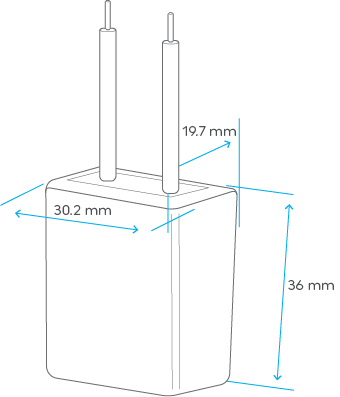
Étape 1 : Identifier le type de charge
- Lors du contrôle d'une LED, d'une CFL ou d'une lampe fluorescente avec l'interrupteur à 3 fils, cet adaptateur de luminaire
- Si vos ampoules ne répondent pas à la charge minimale de 15 W, ou si vos luminaires répondent à cette exigence, mais qu'il s'agit d'ampoules non dimmables ou d'ampoules connectées Cync/C de GE, cet adaptateur de luminaire est nécessaire pour garantir le bon fonctionnement de l'interrupteur. Pour savoir quand un adaptateur est requis, cliquez ici .
- Après avoir installé votre interrupteur à 3 fils Cync/C de GE, si les lumières de ce circuit commencent à clignoter ou affichent un faible niveau de lumière lorsque l'interrupteur est éteint, l'adaptateur est requis.
Étape 2 : COUPEZ L'ALIMENTATION AVANT D'INSTALLER L'ADAPTATEUR
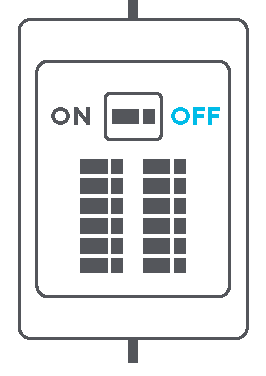
- Coupez l’alimentation de l’interrupteur et de l’emplacement du luminaire au niveau du boîtier du disjoncteur.
Étape 3 : Choisir l’emplacement d’installation
- L'adaptateur de luminaire doit être connecté au neutre et l'alimentation commutée à la charge. Installez l'adaptateur à l'intérieur d'un luminaire de charge ou du coffret électrique.
Étape 4 : Installation de l'adaptateur de luminaire dans un luminaire
- Connectez un fil de l’adaptateur au fil neutre.
- Connectez le fil restant de l’adaptateur au fil chaud du luminaire.

Étape 4 : Installation de l'adaptateur de luminaire dans un interrupteur
- Connectez un fil de l’adaptateur au fil neutre.
- Connectez le fil restant de l’adaptateur au fil chaud de l’interrupteur.

Étape 5 : Confirmer l’installation
- Une fois le luminaire et l'interrupteur fixés et qu'aucun fil n'est exposé, rétablissez le courant au disjoncteur. Vérifiez le bon fonctionnement de vos lumières en les éteignant au niveau de l'interrupteur Cync/C by GE. Dans de très rares cas, vos lumières peuvent encore scintiller ou afficher une faible luminosité. Dans ce cas, un autre type de charge pourrait être nécessaire.