
Camera FAQs
Frequently asked questions for the Indoor and Outdoor Cync Smart Cameras.
Jump to FAQs specific to the Indoor Camera or Outdoor Camera:
Indoor and Outdoor Camera FAQs
Are the Cync Indoor and Outdoor Cameras wire-free?
The indoor camera uses a USB power adapter that must be plugged into an outlet, so it’s always on and ready to detect what’s happening. It uses Wi-Fi to connect to the cloud and enable live-streaming, real-time alerts, and clip recording.
The outdoor camera has two versions, a battery-powered outdoor camera and a wired outdoor camera. The wired outdoor camera must be plugged into an outlet. The battery-powered outdoor camera requires it's battery to be charged.
What is the length of the electrical cord?
- Indoor Camera: 9 feet
- Wired Outdoor Camera: 24 feet
How does the camera save user videos?
Data privacy is extremely important to us. We are giving our users two options based on their personal preferences. You can use a microSD card (sold separately) which allows you to store video locally on the camera and retrieve it securely via the Cync app. Alternatively, the Cam Cync subscription allows video to be backed up and accessed from anywhere via secure cloud storage. For an extra layer of security, two-factor authentication is always required when using the Cync app to view live streams or stored clips.
Does the camera require a subscription or a monthly fee?
No. Users without a Cam Cync subscription can still view live video, use two-way talk, filter alerts by sound, motion, or people detection, and other great features. Adding a Cam Cync subscription or an optional microSD card for local storage (sold separately) enables clip recording so you never miss a moment.
Can I buy one subscription for multiple cameras, or do I need a subscription for each Cync camera?
Each camera requires its own subscription at this time.
Do the Cync Indoor and Outdoor Cameras work with voice assistants?
Can I view the livestream through the Alexa app and its voice assistant?
You can view your camera's livestream through the Alexa app and the Alexa voice assistants that have a screen, like the Alexa Show. You can also enable two-way talk via compatible Alexa devices.
Can the camera be used at night?
Yes, our camera has automatic night vision included so you can capture videos at nighttime. Note that placing the camera looking through a window will cause issues when using night vision. If using the camera in this way, we suggest turning off the night vision feature in settings.
Why is there a light ring halo when using night vision?
This happens when you don't remove the protective cover on the front camera shutter. Remove this cover and the light ring halo will go away.
Does the camera record and send notifications when motion is detected?
Yes, when motion is detected the camera will begin recording and send a notification to Cync users who share access to the camera within the Cync app.
Will the camera only notify me if a person is detected, or does it notify me for all motion activity?
You can choose to be notified of sound and/or motion events. You can additionally enable person detection, which filters motion alerts so that they are only triggered when a person is detected (as opposed to a tree branch moving or a dog walking in front of the camera).
Can I view multiple live feeds at the same time?
Yes! On the home screen of your Cync app, you can see live preview videos of multiple cameras at once.
Who can view my camera feeds?
Only the Admin can view the camera live feeds. Guests are unable to view or access cameras.
Can I use the Cync Cameras without Wi-Fi?
No, a 2.4GHz Wi-Fi network connected to the internet is required to use the camera. Note that very slow internet speeds will likely impact the functionality of the camera, such as issues loading live streams or recording clips with the Cam Cync subscription.
Can I manually record video or take pictures?
Yes, there are buttons to both take a screenshot as well as record a video when viewing the live stream. These images and videos are stored to your phone’s camera roll.
Will my Indoor or Outdoor Camera continue to record locally from my SD Card after losing Wi-Fi?
As long as your device was commissioned prior to losing WiFi connection, your camera will continue to record clips locally to the SD card.
Why can't I view my Cync camera's live feed in the Google Home application?
In order to view live feed from your Cync Camera on the Home app, Google requires a Chromecast or Smart Display to access the camera's feed.
Indoor Camera FAQs
Can I use this camera outdoors?
No, the Cync Indoor Camera is rated for indoor use only.
Can I control the privacy shutter from my phone?
The physical privacy shutter on the camera can only be controlled from the physical camera. However, you can enable and disable privacy mode from the Cync app when the physical privacy shutter is not pushed up and blocking the camera lens.
Can the Cync Indoor Camera be placed facing out a window to capture outside activity?
Yes, but automatic night vision will cause image distortion when the camera is facing out of a window due to reflection. If placing the camera in this way, we suggest turning off night vision in settings.
Can I mount the camera on a ceiling?
Yes! You can mount the camera on a ceiling, and you can enable a 180-degree image flip in the settings menu to show the image right-side up in the app.
Outdoor Camera FAQs
What is the Wi-Fi range for this Outdoor Camera?
Keep the camera in a strong Wi-Fi signal strength. Check your Wi-Fi signal strength at the camera's location. You can do this by looking at the Wi-Fi signal strength on your phone. 1 or 2 bars indicates that the signal may not be strong enough for the camera to connect, or remain connected consistently.
What is the maximum and minimum temperature the plug can be in?
Operating temp: -20 ~ 50C
Storage temp: -20~70C
Can I plug it into an outdoor extension cord?
The Outdoor Wired Camera comes with a 24ft wire, but an outdoor extension cord can be used.
How long does the battery on the Outdoor Battery Camera last?
Battery Life is estimated to last about 90 days per charge under normal circumstances. Number of detections, live streaming, Wi-Fi strength and connectivity as well as temperature can impact the battery life. To conserve your battery life, review the information below:
Ways to Save Battery Life
Cync battery camera is designed to go months for full charge. However, the real battery life is dependent on camera settings, app settings, and the user’s home environment. For issues with battery performance, check for the following factors.
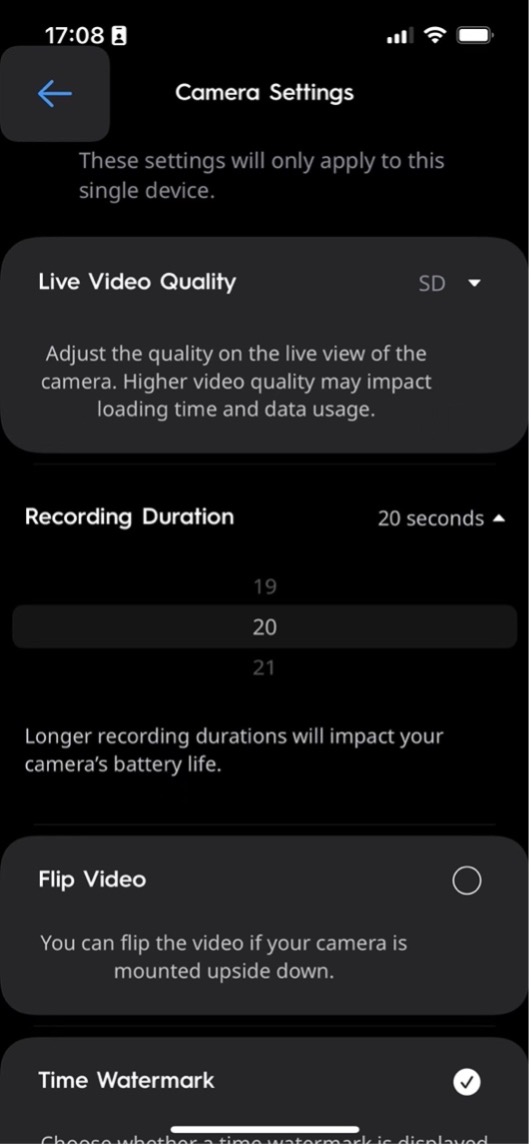
Recording Duration
The default Recording Duration is 30s. You can reduce the value to save battery life.
- Select your Device
- Select Setting in the top right corner.
- Select Camera Setting.
- Select Recording Duration.
Detection Settings
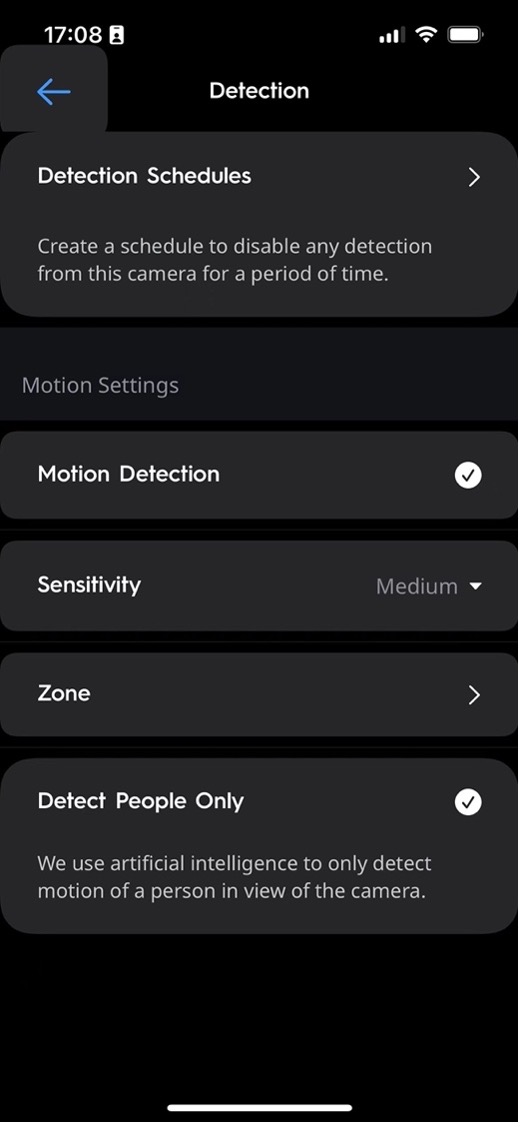
The more events captured/recorded by your battery camera, the more battery is used. To prevent excessive activity, you can:
- Use Live View/Playback sparingly
- Adjust sensitivity setting to a lower sensitivity
- Enable Zone detection
- Enable Detect People Only
- Add Detection Schedules to disable any detection for specific time period
- Adjust deactivation time setting to a higher value (future app feature)
What to do:
- Select your Device
- Select Setting in the top right corner
- Select Detection Setting
Wi-Fi Connectivity
Poor Wi-Fi connection will cause the battery to drain too fast.
Symptoms of Poor Wi-Fi Connection:
- Receive offline notification frequently
- Trouble connecting to live stream
- Poor video/audio quality
- Delayed notifications
- Miss motion detection events
What to do:
- Reinstall the battery to reboot camera
- Reboot router
- Remove physical barriers between battery camera and router
- Move the router and battery camera closer together
- Replace the router
- Check RSSI (future app feature), recommend RSSI -50
Avoid Cold Weather
Cold weather can reduce battery performance as well. The Cync outdoor battery camera use Lithium-ion batteries.
- The operation temp rang: -20°C ~ 50°C
- The charging temp range: 0°C ~ 50°C
Cold weather has a big impact on battery performance.
- Exposure to cold temperature will lower the battery capacity run out of power faster than expect
- Below 0 degree, not be able to charge the battery
What to do:
- Bring the battery pack inside and charge with USB cord.
- Make sure your battery is charged to 100% before remount.