
Wired Smart Switches FAQ
Frequently asked questions on Cync Wired Smart Switches.
Jump to FAQs specific to the 3-Wire (No Neutral), 4-Wire (Neutral Required), or Traveler + Neutral Wire Smart Switches:
4-Wire (Neutral Required) Switches
Traveler + Neutral Wire Switches
General Wired Smart Switches FAQs
What’s the difference between the 3-Wire (No Neutral) and 4-Wire (Neutral Required) Smart Switches?
3-Wire (No Neutral) Switches are compatible with older homes that may not have a Neutral Wire in the switch outlet box. If you do not have neutral wires in your switch outlet box, the 3-Wire (No Neutral) Smart Switch is for you. If you do have neutral wires, then we recommend the 4-Wire (Neutral Required) Smart Switch.
Do these Wired Smart Switches work with 2.4 GHz and 5 GHz bands?
Cync or C by GE Wired Smart Switches only work with 2.4 GHz but are compatible with most networks that combine 2.4GHz and 5GHz bands into a single network.
Can I connect and control other Cync or C by GE devices with these switches?
Yes, you can control other Cync or C by GE devices by assigning those devices and the switch to the same app Room or Group in the Cync app.
Our Wired Switches also enable voice and out-of-home control for our Cync or C by GE Bluetooth lights by simply assigning your wired switch to the same app Home as your Bluetooth lights. For voice control, you will need to link your C by GE account with Alexa and/or Google.
Can I connect these Wired Smart Switches with smart devices from other manufacturers?
No, our Wired Smart Switches only work with Cync or C by GE smart devices.
What are integrated fixtures, and are Cync Switches compatible?
Integrated fixtures don't have a socket where a bulb can be screwed in and do not have bulbs that can be replaced. Generally, they have wires that connect directly to the home wiring and a light comes from part of the fixture.
Cync Switches are designed to be used with triac-dimmable fixtures and LED bulbs. Cync Switches are not compatible with fluorescent tubes, fluorescent ballasts, LED replacement tubes, electronic or magnetic low-voltage transformers. 3-Wire Dimmers are safe to use with dimmable integrated fixtures but the performance cannot be guaranteed.
Can I use these switches in a 3-way/multi-way setup?
Yes, our Wired Smart Switches are compatible in multi-way installs. However, all switches on the circuit must be a Cync or C by GE Smart Switches.
Can Cync 3-Wire (No Neutral) and 4-Wire (Neutral Required) Smart Switches be installed on a circuit that controls an outlet?
No, Cync Smart Switches are not compatible with, and cannot control an outlet. They are only compatible with light fixtures.
Why can't my Cync Smart Switch control a circuit that controls an outlet?
Our Wired Smart Switches only work with other Cync products. As Cync does not offer an outlet, we cannot mix smart and non-smart devices.
Can I control these switches when I’m away from home?
Yes, our Wired Smart Switches are Wi-Fi enabled. So, you can control them out-of-home without the need of a hub or additional device. Just use the Cync app.
Can I use these switches outside?
No, our Wired Smart Switches are for use indoors and must be protected against the elements.
Will these wired switches fit inside a wall box with a mud ring?
Yes, our Cync/C by GE 3-Wire (No Neutral) and 4-Wire (Neutral Required) Switches will fit inside a switch wall box that has a mud ring. In some cases, the mud ring may cause the wall box to become shallow, which could cause difficulty fitting the Cync or C by GE switch inside the box.
If I have Cync or C by GE lights on the same circuit as the smart switch and I turn off the switch, will the light bulb still function with the app and voice control?
As long as the Cync or C by GE Lights are assigned to the same Cync App Room as the Smart Switch and the Bulb Type Setting for that Smart Switch is set to “Cync/C by GE Smart Lights”, (this setting is located under Settings > Devices > Manage Devices> then select your Smart Switch) then you will never lose voice/app control of your Smart Lights, even when the Wired Smart Switch is turned off. This is because the smart switch is sending a Bluetooth command to turn the Cync or C by GE Lights off instead of cutting off the power to the lights.
What kind of wall plate do I need for these switches?
They come with a single gang switch plate in the box. If you are installing into a multi-gang application, you can purchase standard multi-gang switch plates that will also work with our smart switches.
Are there other switch color options besides white?
Currently we offer white but are exploring opportunities to expand color options. Stay tuned to our website and social media channels for updates.
Can I use these switches with a ceiling fan?
Our Wired Smart Switches are not compatible with ceiling fans.
How many Smart Wired Switches can I connect to the Cync app?
You can have up to 50 devices in one Cync App Home.
Can I control these switches with Alexa, Google and HomeKit?
Our Smart Wired Switches are compatible with Alexa and Google. They are not compatible with HomeKit. Because our switches are Wi-Fi and Bluetooth enabled, you can control it with Alexa and Google without the need of a hub or additional device. For voice control, you will need to link your Cync account with Alexa and/or Google .
Can I connect these switches directly with Google like I did with my C by GE Smart Lights (Google Seamless Set Up)?
Our switches are not Seamless Set Up compatible and cannot be set up directly through the Google Home app. However, they do Work with Google, which requires the Cync app for set up, then linking your Cync account with the Google Home app.
Are these switches compatible with Wink?
No, our Cync and C by GE Wired Smart Switches are not compatible with Wink.
Do these switches work with Smartthings?
No, our Cync and C by GE Wired Smart Switches are not compatible with Smartthings.
Are Cync Wired Switches compatible with ELV/MLV dimming?
No, our Cync Switches are only capable of TRIAC dimming.
Do I need a ground wire to install Cync Switches?
Yes, a ground wire is required for all Cync Switches.
Are neutral wires required to install Cync Switches?
We offer two versions of the Cync Smart Switch: one that requires a neutral wire, which is called the 4-Wire (Neutral Required) Switch, and one that does not require a neutral wire, which is called the 3-Wire (No Neutral) Switch. If your switch box does not have neutral wires, the 3-Wire (No Neutral) Switch is the recommended product for you.
Can I install Cync Switches in a home with knob and tube wiring?
Knob and tube wring is not compatible with Cync Switches due to the risk of lower grade copper, and the potential of deterioration/snapping of the wires.
Can I install a Cync Switch on the same circuit as a different brand's smart switch that controls the same set of lights (3-Way/Multi Way circuit)?
All switches on the same circuit must be a Cync Smart Switch. Our switches will not function properly if they are mixed with a basic on/off switch, or a non-Cync Smart Switch on the same circuit.
Can I install a Cync Switch on the same circuit as a traditional switch that controls the same set of lights (3-Way/Multi Way circuit)?
All switches on the same circuit must be a Cync Smart Switch. Our switches will not function properly if they are mixed with a basic on/off switch, or a non-Cync Smart Switch on the same circuit.
On a 3-Way/Multi-Way circuit, can I mix 3-Wire (No Neutral) Cync Switches with 4-Wire (Neutral Required) Cync Switches?
All switches on the same circuit must be either a 3-Wire (No Neutral) Switch or a 4-Wire (Neutral Required) Switch. Mixing these two types of switches is not compatible.
On a 3-Way/Multi-Way circuit, can I mix Cync Dimmers and Cync On/Off Switches?
- If you are installing 3-Wire (No Neutral) Cync Switches, mixing Cync Dimmers and Cync Switches is not compatible. All switches on the circuit must either be 3-Wire Dimmers or 3-Wire On/Off Switches.
- If you are installing 4-Wire (Neural Required) Cync Switches, you can mix Cync Dimmers and Cync On/Off Switches on the same circuit, but only if the Cync Dimmer is on the Load Side of the circuit.
Are Cync Switches compatible with LED Drivers?
Due to the variety of LED drivers in the market, and their wide variety of specifications, we cannot guarantee compatibility with Cync Switches.
Are Cync Switches compatible with CFL bulbs?
Yes, Cync Switches are compatible with CFL bulbs. However, there are specific requirements based on the type of Cync Switch you are installing:
- 3-Wire (No Neutral) Switches require the bulb adapter that is included in the box.
- 4-Wire (Neutral Required) Dimmers: after installation, when you are pairing your dimmer in the Cync app, select the 'Non-Dimmable' load type because CFL bulbs cannot dim.
Are Cync Switches compatible with Florescent Fixtures with Electronic or Magnetic Ballasts?
- 3-Wire (No Neutral) Cync Switches are not compatible due to high capacitance and high switching frequency within the ballast circuitry which may cause interference with our switches.
- 4-Wire (Neutral Required) Cync Switches are compatible, however, they can only control On/Off functionality. They will not be able to dim.
How do I factory reset / power cycle my Cync Switch?
See the Resetting and Power Cycling Wired Switches article.
3-Wire (No Neutral) Smart Switch FAQs
What wires do I need in my switch outlet box to install a 3-Wire (No Neutral) Smart Switch?
3-Wire (No Neutral) Smart Switches require Line, Load and Ground wires
What is the maximum power rating for C by GE wired switches?
450 watts for incandescent/halogen. 150 watts for LED.
What is the minimum load required for Cync or C by GE 3-Wire (No Neutral) Switches?
Our 3-Wire (No Neutral) switches require a 15W minimum load. It’s important to check the actual wattage—not the replacement wattage—printed on the bulb or package to determine the total wattage on your circuit.
If your light bulbs don’t meet the 15W minimum load requirement for our 3-Wire (No Neutral) Switch, you have a few options:
- Attach the Bulb Adaptor that came with your switch to one of your light bulbs on the circuit. The bulb adaptor comes inside the package with your 3-Wire (No Neutral) switch.
⇒ Installation Instructions for Bulb Adaptor
- If the bulb adaptor is not the right size for your light bulbs, or doesn’t fit your fixture, you can install our Fixture Adaptor to the actual fixture in the ceiling. Contact Cync Customer Service to request one: 1-844-30C-BYGE (1-844-302-2943).
⇒ Installation Instructions for Fixture Adaptor
When should I use the bulb adaptor that came with my 3-Wire (No Neutral) switch?
Depending on the bulb type or the minimum load of your lights, you may experience functionality issues, including flickering lights, no power or unstable power to the Smart Switch, or difficulty connecting the switch to the Cync app. In these cases, the bulb adaptor is required.
⇒ Details and Assistance with the 3-Wire (No Neutral) Smart Switch Bulb Adaptor
What if the bulb adaptor doesn’t fit the light bulbs on the switch circuit?
For some situations where a bulb adaptor is not applicable, like integrated fixtures, or non-medium base lighting fixtures, you have a couple options:
- Replace your lights with light bulbs that do meet the 15W minimum load requirement.
- If the bulb adaptor is not the right size for your light bulbs, or doesn’t fit your fixture, you can install our Fixture Adaptor to the actual fixture in the ceiling. Contact Cync Customer Service to request one: 1-844-30C-BYGE (1-844-302-2943).
⇒ Installation Instructions for Fixture Adaptor
Where can I get a Cync Fixture Adaptor for my 3-Wire (No Neutral) Smart Switch?
Contact Cync Customer Service to request a fixture adaptor: 1-844-302-2943
Why is the LED light on my 3-Wire (No Neutral) Smart Switch not flashing blue after I’ve installed it?
After you’ve installed our 3-Wire (No Neutral) Smart Switches and turned power back on to the switch, if the LED light on the switch is not flashing blue, this means you cannot pair your switch to the Cync app. There are a few reasons as to why it’s not flashing blue.
- LED indicator light or light ring will flash red if the circuit is overloaded. Max load rating 1.25 amps for LED and 5 amps for incandescent/halogen.
- Immediately after turning power back on, the LED indicator light or light ring will not illuminate if wired incorrectly.
- After 10 minutes of turning the power back on, if you still have not paired the 3-Wire (No Neutral) switch with the C by GE app, the LED will stop blinking blue. To get the switch back into setup mode, factory reset the switch by holding the on/off button for 10 seconds. It will flash red, then you can release, and it blinks blue again.
What light bulbs are compatible with these 3-Wire (No Neutral) Smart Switches?
Our 3-Wire (No Neutral) Switches and Dimmers are compatible with Incandescent/Halogen light bulbs, Dimmable LEDs, Non-Dimmable LEDs and C by GE Smart Light Bulbs.
These light bulbs have been specifically tested with Cync/C by GE 3-Wire (No Neutral) Switches + Dimmers and meet our standards. Other light bulbs not on this list may also work effectively, but have not been tested by our team:
⇒ 3-Wire (No Neutral) Switches – Compatible Light Bulb List
⇒ 3-Wire (No Neutral) Dimmers – Compatible Light Bulb List
NOTE: All incandescent and halogen lights bulbs are compatible with our 3-Wire (No Neutral) Smart Switches, so you will not see these bulb types on the compatibility lists.
4-Wire (Neutral Required) Smart Switch FAQs
What wires do I need in my switch outlet box to install a 4-Wire (Neutral Required) Smart Switch?
4-Wire (Neutral Required) Smart Switches require Line, Load, Ground and Neutral wires.
What is the minimum load required for Cync or C by GE 4-Wire (Neutral Required) Switches?
Our 4-Wire (Neutral Required) switches do not require a minimum load.
What is the maximum power rating for C by GE wired switches?
450 watts for incandescent/halogen. 150 watts for LED.
Why is the LED light on my 4-Wire (Neutral Required) Smart Switch not flashing blue after I’ve installed it?
After you’ve installed our 4-Wire (Neutral Required) Smart Switches and turned power back on to the switch, if the LED light on the switch is not flashing blue, this means you cannot pair your switch to the Cync app. There are a few reasons as to why it’s not flashing blue:
- LED indicator light or light ring will flash red if the circuit is overloaded. Max load rating 1.25 amps for LED and 5 amps for incandescent/halogen.
- Immediately after turning power back on, the LED indicator light or light ring will not illuminate if wired incorrectly.
- After 10 minutes of turning the power back on, if you still have not paired the 3-Wire (No Neutral) switch with the C by GE app, the LED will stop blinking blue. To get the switch back into setup mode, factory reset the switch by holding the on/off button for 10 seconds. It will flash red, then you can release, and it blinks blue again.
What light bulbs are compatible with these 4-Wire (Neutral Required) Smart Switches?
Our 4-Wire (Neutral Required) Smart Switches are compatible with Cync or C by GE lights and most LED bulbs as long as the total circuit wattage does not exceed 150W.
These light bulbs have been specifically tested with Cync/C by GE 4-Wire (Neutral Required) Switches + Dimmers and meet our standards. Other light bulbs not on this list may also work effectively, but have not been tested by our team:
⇒ 4-Wire (Neutral Required) Switches + Dimmers – Compatible Light Bulb List
NOTE: All incandescent and halogen lights bulbs are compatible with our 4-Wire (Neutral Required) Smart Switches, so you will not see these bulb types on the compatibility lists.
Troubleshooting for Buzzing Switch
Some low threshold level of buzzing is normal if listening close to the switch. If the switch is buzzing at a volume above the threshold, try these common solutions.
- If total circuit wattage is over 150W for an LED bulb or over 450W for an incandescent/halogen bulb, remove some lights from the circuit or replace with lower wattage bulbs.
- If the buzzing sounds originates from the light bulbs, swap in a different incandescent/halogen bulb or a bulb from the compatible list.
- Ensure load wattage on the switch circuit is at least 15W.
- If you are using any non-dimmable bulbs, install the 3-Wire (No Neutral) Switch Adapter.
- The 3-Wire (No Neutral) Switch Adapter can be screwed in. If screw is not compatible, use the two-wire version.
- If the load is a Cync Smart Bulb, ensure load type is set to Smart/Cync lights in the Cync App.
- If the switch type is a Dimmer or Motion Dimmer, ensure the load lights are dimmable.
- If the switch type is an On/Off switch and the bulb is NOT on the compatible list, swap in a different incandescent/halogen bulb or a bulb from the Compatible list.
NOTE: This smart switch is not compatible with ceiling fans. We have a specific product designed for ceiling fans, the Cync Ceiling Fan Smart Switch.
Traveler + Neutral Wire Smart Switch FAQs
What is a traveler wire?
A traveler wire is used in 3-way or multi-way switch setups, where two or more switches control the same light. The traveler wire allows communication between switches to coordinate control of the light fixture. It carries the power signal between switches.
How are the new neutral-required switches with a traveler wire different from the older versions?
The new switches support traveler wire functionality, allowing Cync Smart Switches to be paired with standard (non-smart) switches in 3-way or 4-way configurations. This is a key improvement over the older 4-wire models, which required all switches in the setup to be smart switches. See the comparison tables below for more details.
3-Way Configuration
| Wiring Configuration | 3-Way Traditional Switch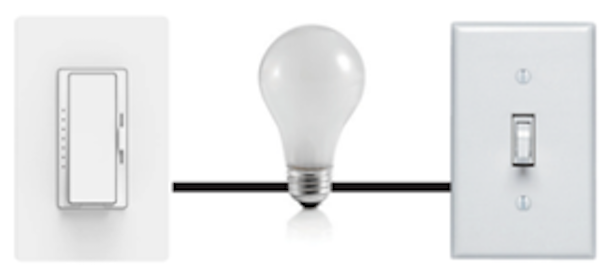 | 3-Way Wiring with Cync Smart Switch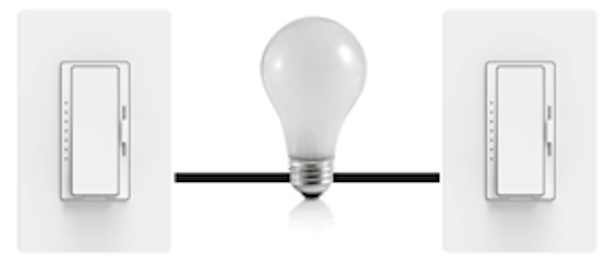 |
|---|---|---|
| Power & Load in Different Box | Compatible. Modify wires at both sides. | Compatible. Modify wires at both sides. |
| Power & Load in Same Box | Compatible. Modify wires at both sides. | Compatible. Modify wires at both sides. |
4-Way Configuration
| Wiring Configuration | 4-Way Traditional Switch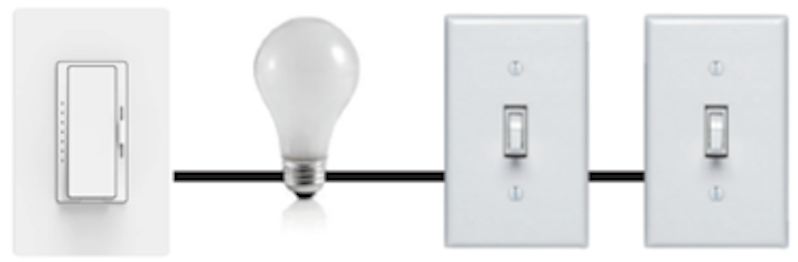 | 4-Way Wiring with Cync Smart Switch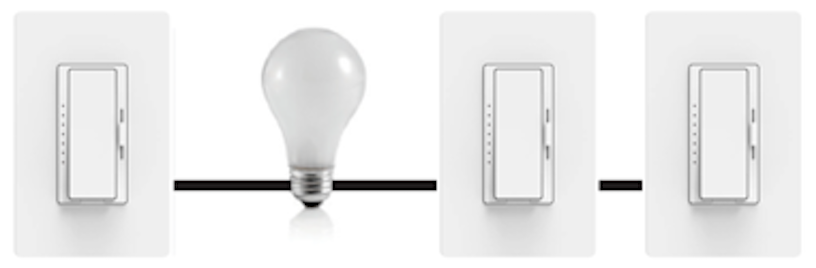 |
|---|---|---|
| Power & Load in Different Box | Incompatible. | Compatible. Modify wires at both sides. |
| Power & Load in Same Box | Compatible. Modify wires at both sides. | Compatible. Modify wires at both sides. |
For more information on wiring details, please refer to the Wiring Compatibility Guide.
How do the ambient light sensor and motion sensor work in Cync Traveler + Neutral Wire Smart Switches when commissioned using matter?
Ambient Light Sensor:
Default state: Disabled
When the motion sensor is active, the ambient light sensor can be toggled on or off by pressing and holding both the Dim Up and Dim Down buttons simultaneously for 5 seconds. A green RGB indicator will flash for 1 second to confirm successful activation. An orange RGB indicator will flash for 1 second to confirm successful deactivation.
Motion Sensor:
Default state: Enabled
To toggle the motion sensor on or off, press and hold both the On/Off and Dim Up buttons at the same time for 5 seconds. A green RGB indicator will flash for 1 second to confirm successful activation. An orange RGB indicator will flash for 1 second to confirm successful deactivation.
For a 4-way installation using only Cync switches, is setup within the Cync app required, or can this be accomplished through Matter pairing methods as well?
Since the Traveler + Neutral Wire Switch products have a traveler wire, you can control a load (turn it on/off) in a 3 or 4-way configuration by physically pressing the switch. For smart control through app or voice, the switched would need to be commissioned using the Cync app or Matter.
As a Matter/Homekit user can I use the top two buttons that are mapped to scene control?
The standards for the Matter are evolving. Currently in Matter, the top two buttons only support dim up/down and ON/OFF functions. Scene control of these two buttons for Homekit users is supported.
What increments does the brightness indicactor represent on the Traveler + Neutral Wire Switches?
| Traveler + Neutral Wire Paddle Switch |
7 Brightness Indicators:
|
| Traveler + Neutral Wire Keypad Switch |
6 Brightness Indicators
|
When using two or more Traveler + Neutral Wire Paddle-style Switches with the brightness slider, what is the expected behavior if the sliders are set to different positions? For instance, if Switch 1 is set very low and Switch 2 is set to 100%, what will happen?
The last setting would supersede the previous setting. For example, if you have one of the switches at 100% brightness and you change the 2nd switch to 60% brightness, the brightness would decrease to 60%. 3 LED indicators would light up on both switches. There would be a mismatch on the physical switch setting and the LED indicator until the slider on the first switch is moved again.